
What Was the Main Theme of HubSpot UNBOUND 2026?
AI readiness. Across sessions, speakers kept making the same point: AI tools are only as good as the data and business context underneath them.


I've spent years telling teams that clean data, mapped processes, and clear ownership matter more than whatever CRM, automation, or AI tool they're buying next. At UNBOUND, that turned out to be the entire conference, plus one thing I haven't pushed as hard: context. Your data tells AI what happened, but your context tells it who you are.
I heard some version of that in eight different sessions our team covered at HubSpot UNBOUND 2026 (formerly INBOUND), including from HubSpot's own CEO. When the people selling the AI tell you it won't fix your data, that's worth listening to.
Everyone is getting the same AI at the same time, including your competitors. So the edge isn't the tool. It's what you feed it. Here are the seven questions UNBOUND answered about getting that part right, and what I'm taking back to the HubSpot portals we build and manage at Cypress North.
No. It amplifies it.
HubSpot Product Marketing Manager Jocelyn Horn put it plainly in her data readiness session: "AI won't fix a bad CRM. It amplifies it." HubSpot CEO Yamini Rangan’s keynote took it a step further: "AI with bad context is worse than no AI at all."
My favorite version of this sentiment came from Darren Smith at Personio, who said if you point AI at a great system, you get scale. Point it at a mess and, "you get the mess - faster, in more channels, wearing a confidence score."
The clearest example of this came from Nejc Škoberne at Sellestial. During his presentation, he shared screenshots of an instance where an agent was asked to find a company's website. When it couldn't find the right one, it grabbed a Bloomberg profile page instead. That one wrong answer then spread to four more fields: the domain became bloomberg.com, the country changed, the LinkedIn page pointed to Bloomberg, and the employee count jumped to about 25,000. One guess turned into five wrong fields.
His fix is simple enough that I'm stealing it: let the agent say "I don't know." Treat "value unknown" as a valid result, not a failure.
Context Home is where you tell HubSpot's AI about your business: your products, your personas, your sales process, and who you're not a fit for. Without that information, Breeze, HubSpot’s AI assistant, writes for a generic company instead of yours.
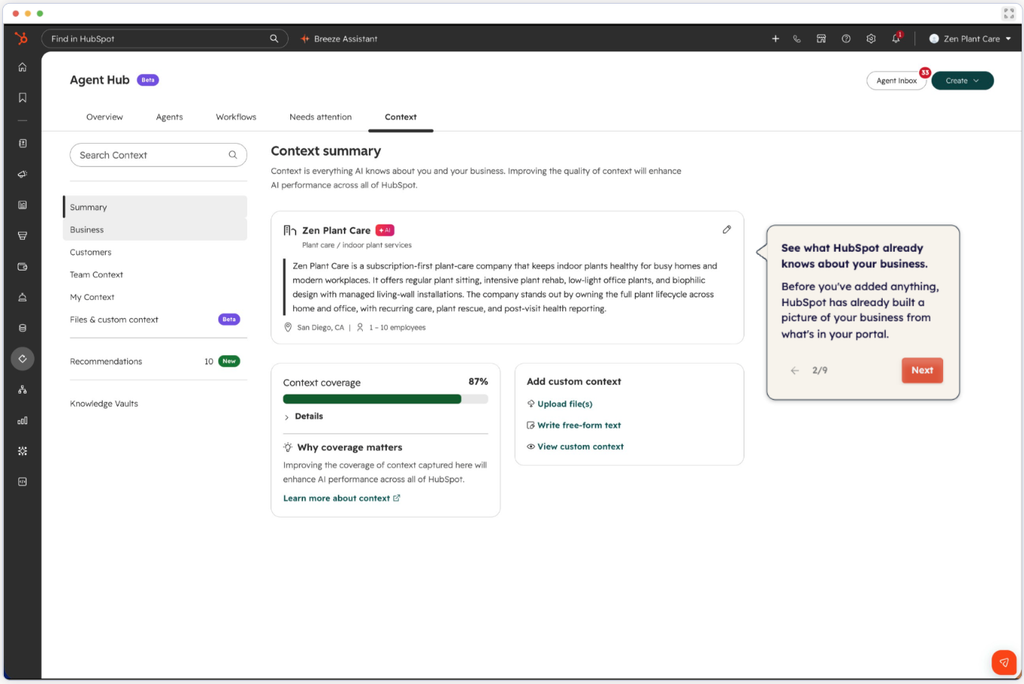
Kyle Jepson with HubSpot Academy recommended starting any implementation with the context page in Agent Hub, before properties or pipelines.
For years, HubSpot setup started with the data model. But when I train new hires, I tell them to define what every lifecycle stage actually means first, before configuring anything. Context Home pushes that one step earlier. Now the first question is "what does the AI need to know about this business?"
The people closest to the data.
New Breed's State of HubSpot 2026 report surveyed more than 1,200 revenue leaders. When they asked who's ready to take advantage of AI agents, the answers were:
Only 5% of revenue leaders said they're confident they'll hit their 2026 revenue targets. And the report's main finding was that investment isn't what sets top performers apart. Operational maturity is.
My read is that managers are probably right to be skeptical. They're the ones looking at the duplicate records and the half-filled deal properties every day. But that's just one survey, so I'm holding it loosely.
Because a defined process isn't the same as an adopted one.
Josh Curcio from Protocol 80 shared that 89% of teams have a defined sales process, but only 36% say it's consistently followed. That's a 53-point gap.
His four-part blueprint for CRM adoption is Map, Build, Inspect, Reinforce. The problem is that most teams spend about 80% of their energy on the first two steps, and adoption is won or lost in the last two. As he put it: "Most CRM adoption problems don't start in the CRM. They show up there."
I've watched this happen. Earlier this year I sat down with a project manager whose team had been trained on HubSpot months before, but stopped using it. She said she kept adding her leads and projects in to track them, but the system wasn't giving her anything back. She still had to open another system for the notes, so HubSpot was two steps instead of one. They'd been trained on the tool, not on their process. That's the kind of cost I wrote about in The Hidden Costs of Choosing a CRM That Doesn't Fit Your Team.
A lot of CRM projects end right after the build and training. Nobody goes back to check whether people are actually following the process. But the work isn't done at launch. Talk to the people using the system every day, find out what's slowing them down, and keep improving the process from there.
Sometimes, yes.
Maarten Bovend'aerde from Digital Reach walked through seven RevOps breaking points in his UNBOUND presentation. The one I recognized right away was operational friction: when a guardrail meant to improve accuracy becomes the reason people work around the system.
He shared the example of required fields being filled with the same placeholder every time. When reps type "TBD" into a required field just to move a deal forward, you're not collecting data. You're collecting guesses.
Josh Curcio said something similar: don't make users fake precision. Ask for early signals first, then tighten the requirements once the details are real.
I had almost this exact conversation with a client this summer. Required fields keep things consistent, but they can also frustrate people into silently going back to the old way. So we started with a list of non-negotiables and let everything else stay optional until the rep actually knows it.
Before you add another required field in your CRM, ask yourself:
If you're stuck on #1, you probably don't need the field.
Not much, based on HubSpot's own research.
Aja Frost from HubSpot shared findings from about 10,000 URLs across 10 companies and eight AI engines. There was little to no correlation between backlinks and AI citations.
What did correlate with AI citations, according to their research:
(Did you notice this post uses question headings? That's on purpose.)
In the data she shared covering 14 million-plus citations, blog posts made up 62.1% of the most-cited pages in Google's AI Mode and AI Overviews. So the blog isn't dead, but keep in mind citations are volatile. Four in 10 drop off after one month, and seven in 10 are gone after six.
In most companies, nobody.
This was another good point made by Darren Smith: Walk around your company and you'll find 100 tools, workflows, and agents with no shared standards. He said, “AI made everyone a builder. Nobody issued the building codes.”
I've seen a small version of that “builder” mentality in nearly every portal, long before AI. Almost every HubSpot-savvy salesperson I've worked with goes a little property crazy. Most of the time, the property already exists - they just don't know what it's called. Now that anyone can spin up an agent or a workflow in minutes, that same habit scales. That's why we need building codes.
Darren described an agent as the same automation with an AI layer added, and that layer bills per run, drifts, and needs governing. His suggestion: stop asking "should we use AI?" and start asking "which layer earns AI?"
HubSpot's framing at UNBOUND was that you'll use both: agents for autonomous work and workflows for deterministic control. My rough rule of thumb (that I’m still testing) is to stick with a workflow when the rule fits in an if/then scenario, if you need the same result every time, or when a wrong answer is expensive, like routing, lifecycle stage, or opt-outs. Try an agent when the answer depends on reading something, like an email, a transcript, or a website, and have a person review the output.
The cost is easy to underestimate. I've seen people run through a month of HubSpot AI credits in one day after turning on one new feature (I may or may not have been one of them when credits first rolled out).
Jocelyn Horn ended her data readiness session with a question for the audience: who owns your AI context settings when your product or positioning changes?
So, who owns yours? If you had to stop and think, that's your answer.
UNBOUND was a lot of talk about AI. Some of it was new product news. But most of the useful tidbits weren’t about AI at all. They were about data, process, and ownership, which are the same problems we've been fixing for years. They just cost more now.
The bottom line for me? If your AI output feels generic or wrong, that's usually a CRM problem, not an AI problem.
Let's talk about what's underneath it.
AI readiness. Across sessions, speakers kept making the same point: AI tools are only as good as the data and business context underneath them.
The headline launches were:
Context Home is where you give HubSpot's AI information about your company, including products, personas, and processes, so Breeze produces output that fits your business instead of generic output.
Start with three things HubSpot highlighted: clean, deduplicated data, completed context settings, and connected tools so agents can see conversations happening outside HubSpot.
As few as you can get away with. When reps have to fill in fields they can't answer yet just to move a deal forward, they type filler like "TBD" to get around it, and your data gets worse. Start with a short list of non-negotiables for each stage. Keep everything else optional until the rep actually knows the answer, then tighten the requirements once the details are real.
Nejc Škoberne from Sellestial shared three safeguards for any agent that writes to your CRM: don't ask it for more than you give it, let it say "I don't know," and check its output before it acts. Without that second one, an agent that can't find an answer will guess, and one wrong guess can spread to several other fields.
Usually both. Use a workflow when the rule fits in an if/then, you need the same result every time, or a wrong answer is expensive, like routing, lifecycle stage, or opt-outs. Use an agent when the answer depends on reading something, like an email, a transcript, or a website, and a person reviews the output. A common pattern is to let the agent make the judgment call, then hand off to a workflow.
HubSpot's research across about 10,000 URLs found little to no correlation between backlinks and AI citations. Question-style headings, FAQ sections, original data, and fresh content correlated more strongly.
SEO (search engine optimization) is about ranking in search results. AEO (answer engine optimization) is about getting cited in AI answers from tools like ChatGPT and Google's AI Overviews. They overlap, but they don't reward the same things. HubSpot's research found backlinks had little to no connection to AI citations, and AI citations move fast: four in 10 dropped off after one month. Most teams need both.

Brooke is a CRM Strategist who joined our digital marketing team in February 2026 and works out of our Rochester office.
In her role, Brooke works closely with our internal teams and clients to audit existing customer relationship management (CRM) strategies and platforms. She then develops strategic roadmaps to ensure those CRMs are optimized for each client and are efficiently driving growth and revenue.
Brooke studied communications and business at the University at Albany, with concentrations in marketing and information systems business analytics. Before joining us at Cypress North, she spent time in the telecommunications and staffing industries, where she led marketing operations, CRM, and automation efforts.
When she’s not working, Brooke likes to have trivia and game nights with her friends, do yoga and pilates, thrift shop, paint, and work with air-dry clay. She also enjoys watching Bravo reality shows, traveling, and spending time with her long-haired dachshund, Tater Tot.
Over the past several years, I’ve been called in to help with more than a few messy Customer Relationship Management (CRM) and HubSpot situations. Some were mid-migration or implementation. Others already poured months (or sometimes years – yikes) and a […]